API Integration
Seamless Integration into Your Existing Web Project
If you already operate your own website and want to sell precious metals there, you can benefit from our technical interface. The entire ordering and payment process runs in the background, while your customers only see your branding.For further information, please refer to the API interface here. https://goldsilberstore.com/api/documentation/
To ensure your customers receive a consistent brand experience at checkout, we recommend uploading your own logo and legal documents in the system beforehand. This information will then automatically appear on every order confirmation.
Two Integration Paths for Different Business Models
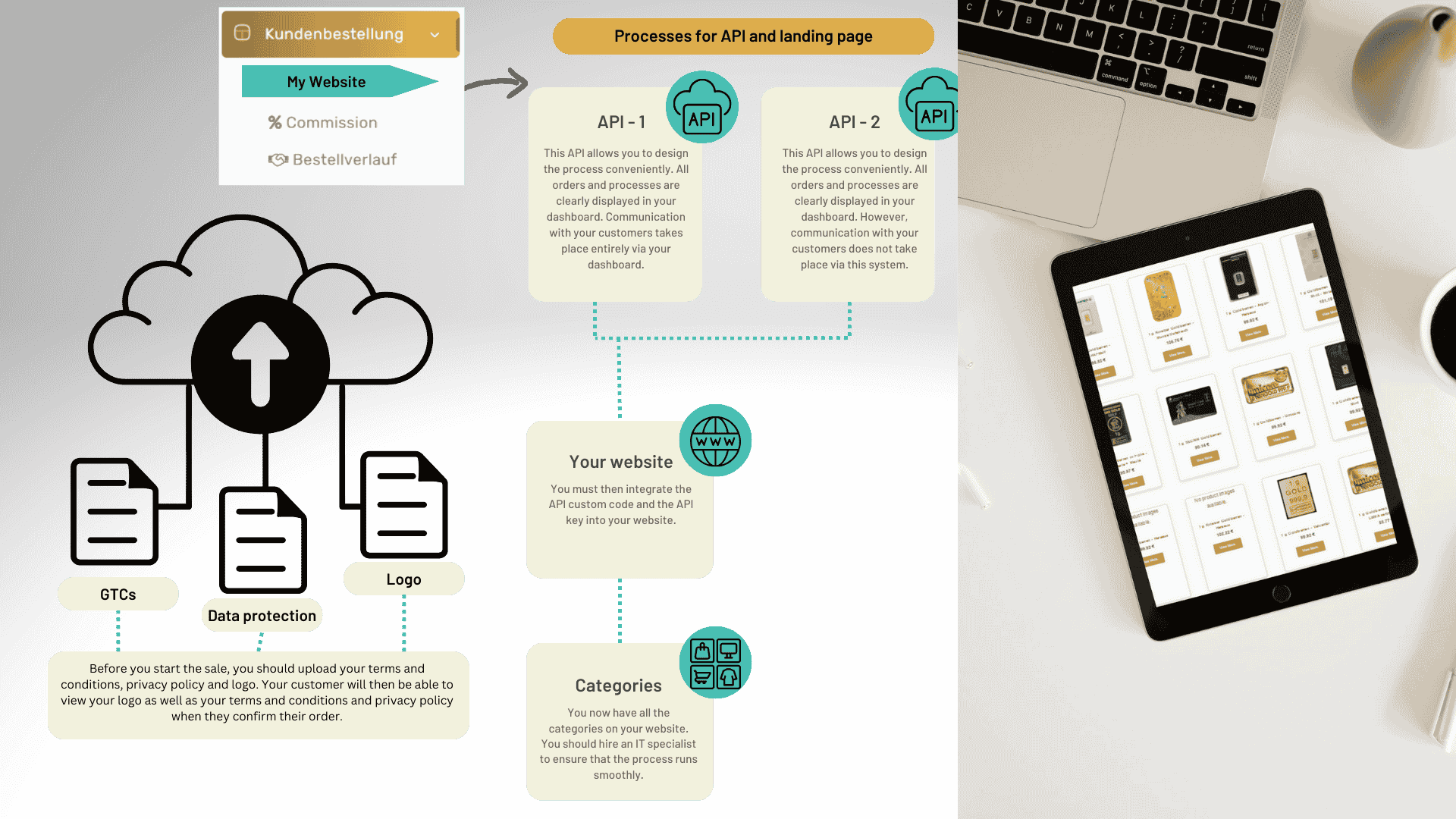
After embedding the provided code and your personal access key, you select the desired categories from the product range to start the sales process.
API-1
With this option, you retain full control over every order process. Incoming orders are displayed in your personal dashboard and can be processed from there. You confirm the payment, and we then take care of shipping. Your customer is automatically notified of every step.
API-2
The difference to API 1 is that in this variant, we do not notify your customers or send invoices. You take care of these tasks yourself. All orders are stored internally in your dashboard and can be viewed there at any time.
First Steps Before Going Live
Provide Legal Documents and Brand Logo
Upload your terms and conditions, privacy policy, and company logo in the dashboard. This information is automatically integrated into the ordering process and visible to your customers.
Complete the Technical Integration
Insert the provided source code along with your individual access key into your website’s code.
Define Product Categories
Determine which product areas should be offered on your page. At least one to two categories are required for the ordering process to function smoothly.
Choose the Right Option
Decide whether you want to coordinate orders manually through your dashboard (API-1) or have the entire process run fully automatically (API-2).
API-1 Workflow: Manual Control of the Order Process
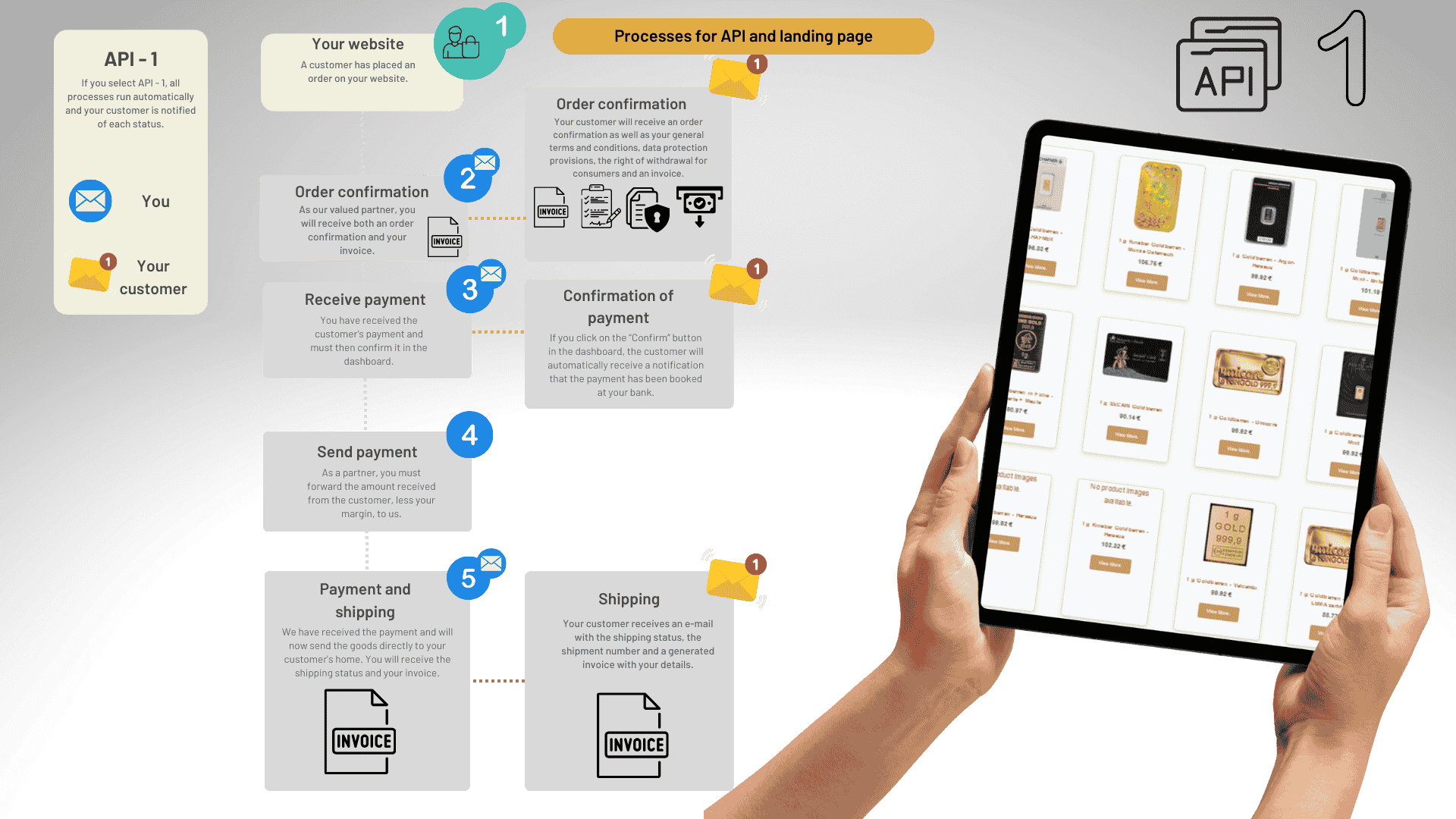
With this option, all customer orders first arrive in your dashboard. From there, you coordinate payment, forwarding, and shipment on your own.
Customer Order Received
As soon as a customer places an order on your site, the order appears in your dashboard for further processing.
Order Confirmation
The buyer automatically receives a confirmation featuring your company logo and your legal information.
Payment Receipt
Payment is made directly to you — either by bank transfer or in cash.
Forward the Amount
After deducting your sales margin, you transfer the remaining amount to us.
Goods Shipment
After payment is received, we ship the ordered goods. Both parties — you and your customer — receive an invoice.
Shipment Tracking
Your customer receives the shipping information and a tracking link via email.
API-2 Workflow: Fully Automated Purchase Processing
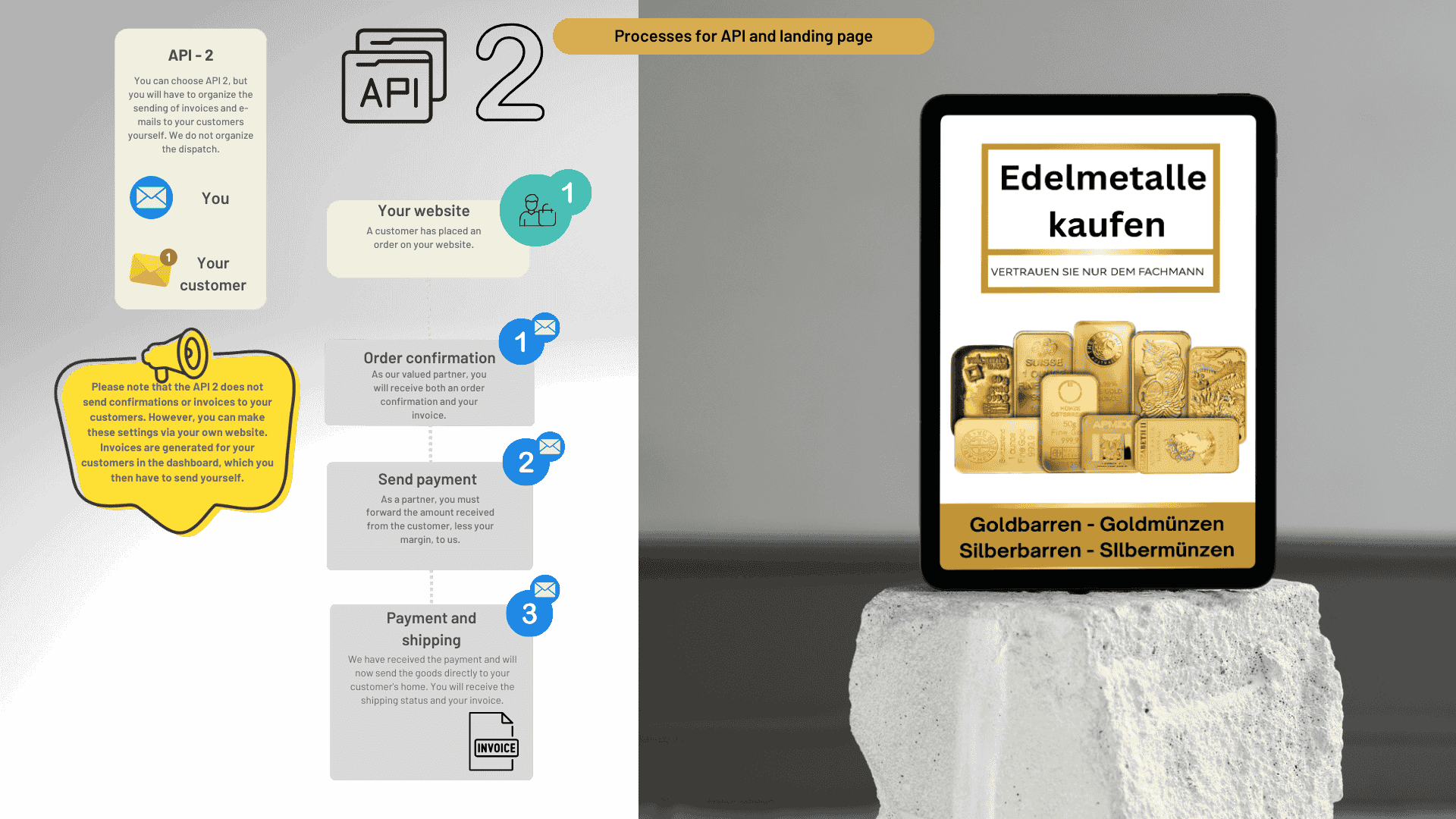
In this option, the customer goes through the entire purchase process without manual intervention. From shopping cart to payment, everything runs automatically, and your profit share is paid out to you by the system.
Automatic Redirect
After selecting products on your website, the customer is redirected directly to the payment process without detours.
Order Confirmation
Both the buyer and you are informed via confirmation and invoice. All payment receipts are processed independently by the system.
Shipping and Margin Payout
Once payment is received, the goods are shipped and your profit share is automatically transferred to your registered account.
Automatic Dunning Process for Outstanding Payments
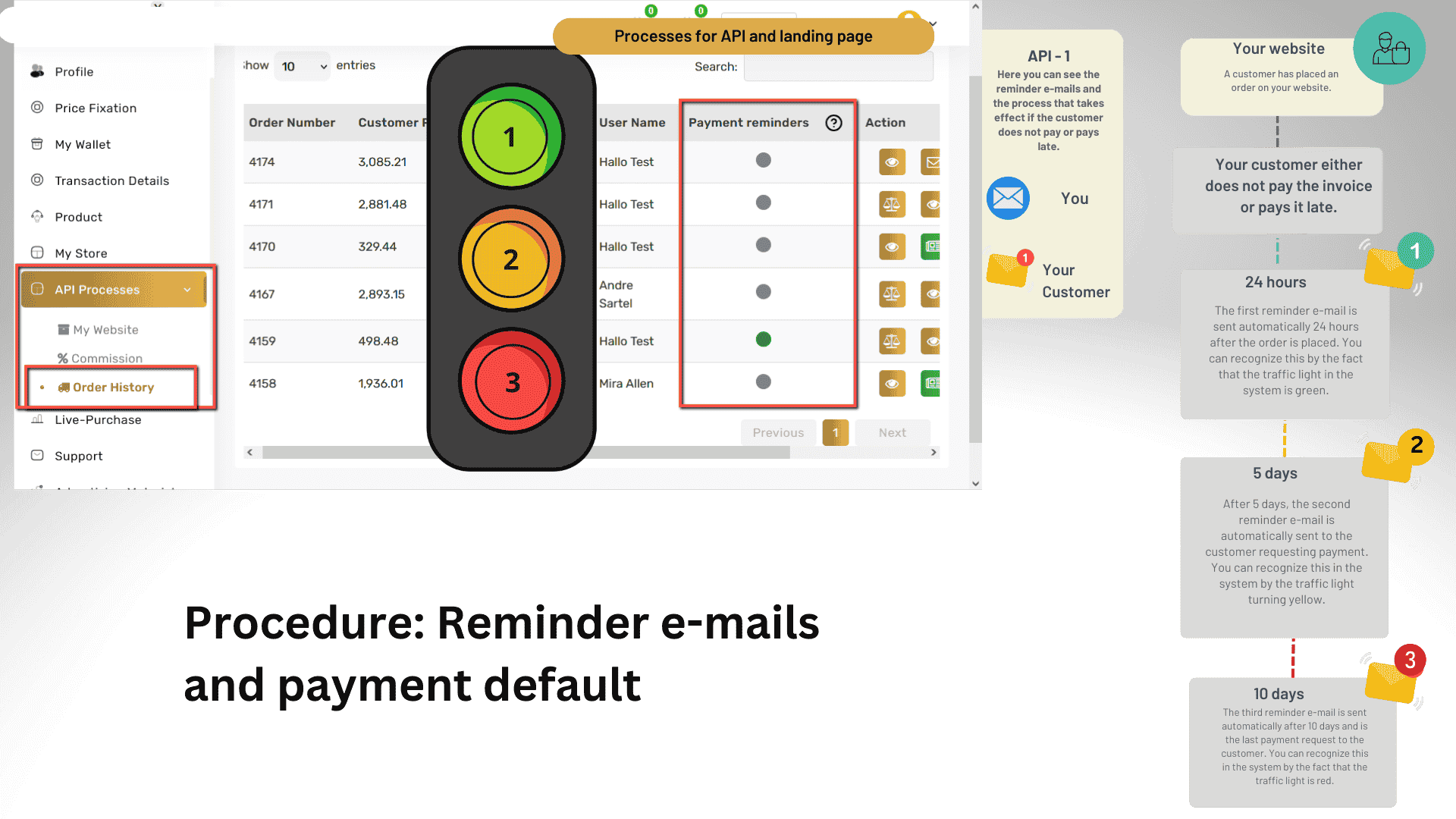
Especially with API-1, it may happen that customers pay late or not at all. In such cases, a three-stage escalation process kicks in, which is traceable through a color-coded status system in your dashboard.
24 Hours
The system sends a friendly payment reminder to the customer.
5 Days
If the invoice remains unpaid, a second notification follows.
10 Days
Without payment, the order is automatically canceled after the deadline expires.
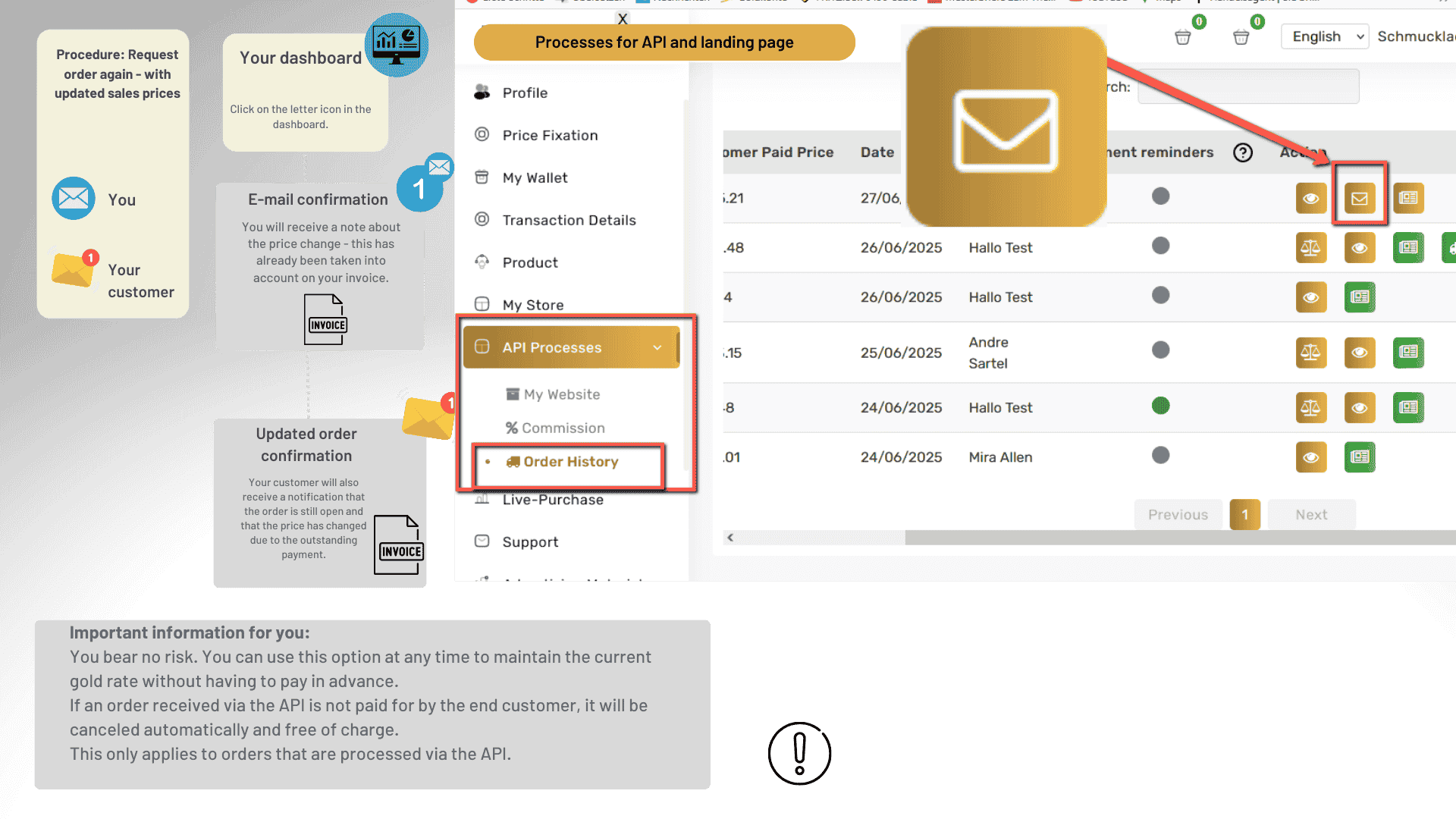
Track and Reactivate Orders
Through the order history in your dashboard, you maintain a complete overview of all API transactions at all times. If needed, an existing order can be regenerated with updated daily prices.
Important Notice
As a partner, you bear no financial risk whatsoever. Unpaid customer orders received through the API are canceled free of charge. You can create an order at the current rate at any time without having to advance any funds.
Sell Under Your Own Name — Technically Secured
Whether manual control or fully automated processing — with our interface, you integrate precious metals trading directly into your existing online presence while maintaining your brand identity.